Meshes
Deborah Schmidt
Head of Helmholtz Imaging Support Unit, MDC Berlin
Sep 29, 2026

Converting voxel datasets into meshes
- Fixed thresholds: Used to generate meshes by separating foreground from background using a set intensity threshold.
- Content-based annotations: Create precise meshes by using annotated regions to define boundaries.
- Machine learning & interactive labeling: Interactive tools combine user input with AI predictions to refine boundaries.
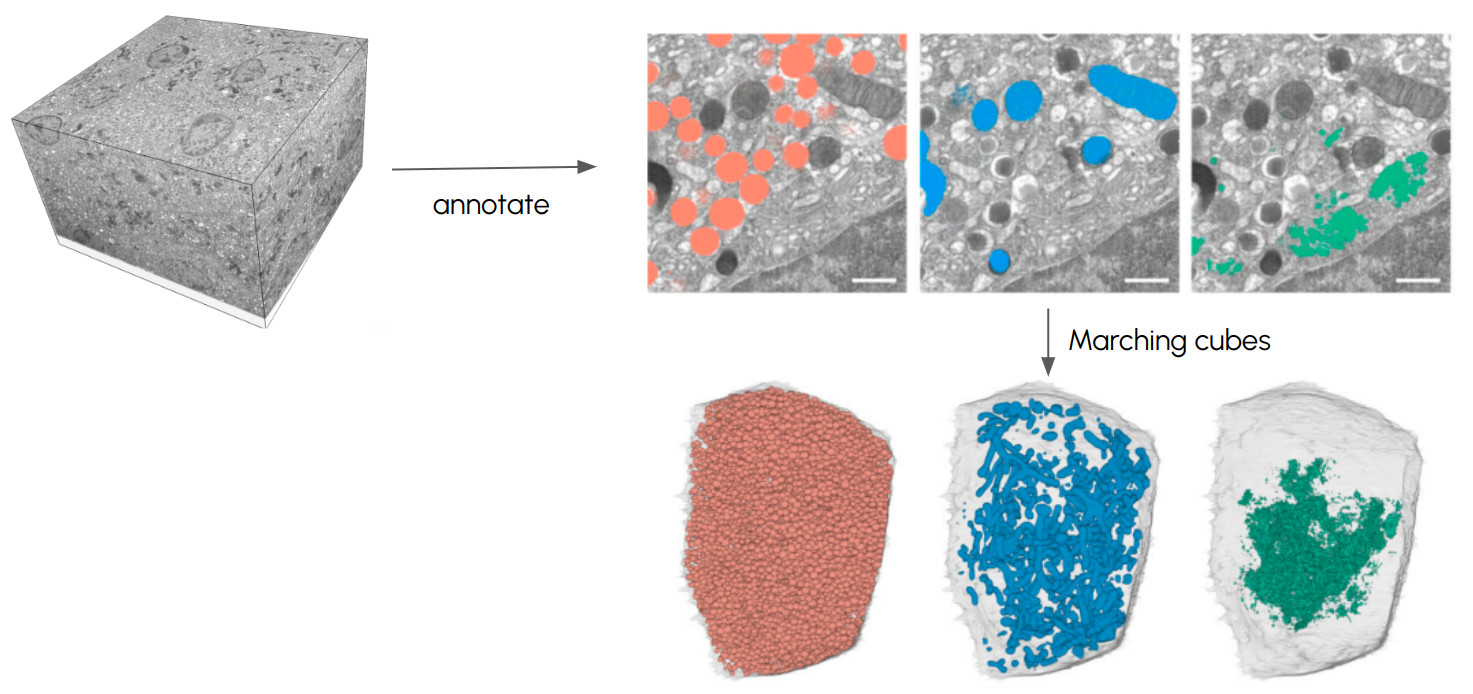
Converting voxel datasets into meshes
Marching Cubes
- One cube of eight voxels at a time - each corner above or below the threshold
- 8 corners → 256 patterns, looked up in a fixed table of which triangles to draw
- A vertex lands where the threshold was actually crossed along an edge
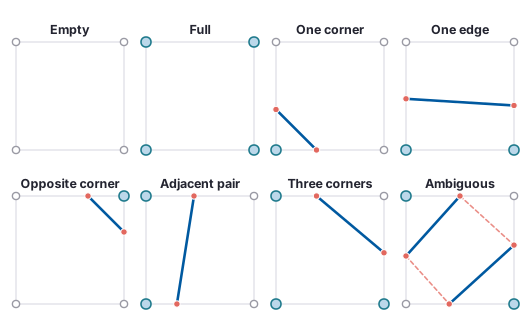
The 2D case (marching squares)
- Lorensen & Cline (1987), Marching cubes: A high resolution 3D surface construction algorithm, SIGGRAPH · figure script
Converting voxel datasets into meshes
The rules, applied
Converting voxel datasets into meshes
Other ways to place the surface
- Marching cubes - a vertex on every crossing edge, from a 256-case lookup table
- Flying edges - the same surface, in four passes over the grid; parallel, and what VTK runs today
- Surface nets - one vertex per cell, at the average of that cell’s crossings
- Dual contouring - surface nets plus the gradients at the crossings, so sharp edges survive
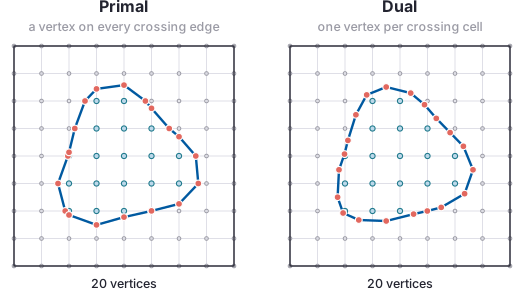
The same field and the same grid. Left, a vertex on each crossing edge; right, one vertex per crossing cell.
- Flying edges: Schroeder, Maynard & Geveci (2015), LDAV · Surface nets: Gibson (1998), Constrained elastic surface nets, MICCAI · Dual contouring: Ju, Losasso, Schaefer & Warren (2002), SIGGRAPH · figure script
Converting voxel datasets into meshes
Make it smoother
- Binary mask in → a lattice, whichever method you picked - every boundary voxel rounded in or out
- Blurred mask in → smooth, details get lost
- Probability map in → smooth and the right size
- Anisotropic voxels: give any distance or blur step the voxel size, or the surface is wrong along the coarse axis
Converting voxel datasets into meshes
The one-voxel border
- An object touching the edge of the volume extracts as an open surface
- One voxel of background on every face closes it -
np.pad(mask, 1).
Converting voxel datasets into meshes
The whole conversion
- Load the volume - and its voxel size
- Threshold
- Pad with one voxel of background
- Blur the mask into a field
- Extract -
contour(method="flying_edges") - Smooth
- Decimate
- Export - STL, PLY or glTF
- Ant: Antscan specimen 1031, Acromyrmex balzani, CC BY 4.0 · Katzke et al. (2026), High-throughput phenomics of global ant biodiversity, Nat Methods 23, 663–672
Large meshes
Three ways to make it cheaper
- Decimation → fewer triangles
- Compression → fewer bytes, same triangles back
- Multi-resolution streaming → fewer triangles loaded for this view
- They combine
- Armadillo: Stanford 3D Scanning Repository, courtesy of Helmut Kungl, non-commercial/educational use with credit · preparation script
- Quadric error metrics: Garland & Heckbert (1997), SIGGRAPH
Rendering meshes
From a script
- off-screen rendering with PyVista mesh_rendering_tutorial.ipynb